proba servicesRequest an audit
← Sample reports

Sample report

Web audit

A scheduling SaaS marketing site

16 pages at 1920×1080111 unique links followed to their final destinationaxe-core WCAG 2.0/2.1/2.2 A + AAconsole and network on every pageJuly 2026

The layout is clean and link integrity is high: 108 of 111 addresses respond, 104 of them directly and 4 through redirects. The bulk of the problems is accessibility — 8 of 17 findings — and it is systemic: contrast, missing landmarks and unnamed links repeat on every page, which points at the template rather than individual pages. The most serious finding is not an automated one: keyboard focus disappearing into an invisible collapsed block only shows up when you test by hand.

F-1Medium

A footer link leads to a 404 — on every page of the site

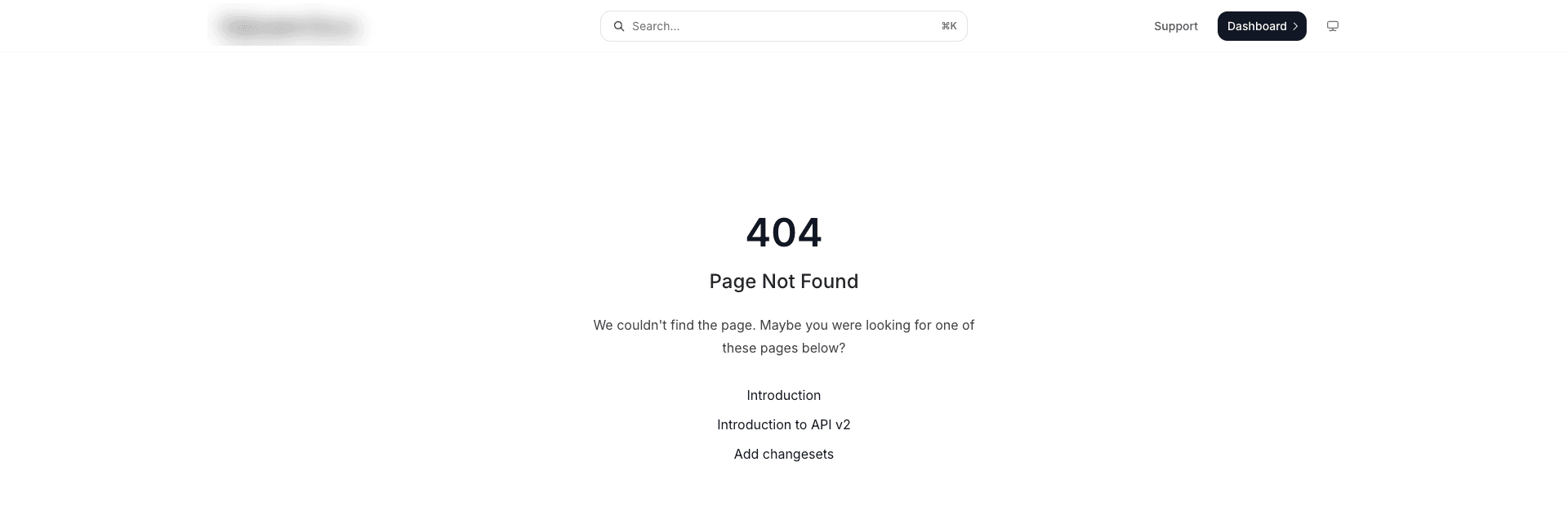
A product link in the footer is present on all 16 checked pages. It responds with a 302 redirect to a documentation page, which in turn answers 404 Page Not Found.

Why this class is dangerous: a one-level link check sees the 302 and counts the link as alive — the defect is only visible when you follow the whole redirect chain.

About the severity: coverage is maximal (16 of 16 pages), but the destination is technical documentation rather than a conversion path, so Medium instead of High. There is a cumulative effect to keep in mind: a 404 in the footer of every page affects search-engine assessment and the impression of the developers this link is aimed at.

Steps to reproduce

  1. Open any page of the site
  2. Scroll to the footer and click the product link
  3. A 404 page opens
A 404 Page Not Found screen opened from a footer link
The final destination of the footer link — 404 after a redirect.

Evidence: Redirect chain and final HTTP status captured for every link
F-2Higha11y · WCAG 2.4.3 + 2.4.7

Collapsed FAQ answers stay in the keyboard tab order

Collapsed accordion answers are hidden visually — opacity 0 and height collapsed to 1px — but remain in the accessibility tree and in tab order: display and visibility are not changed, aria-hidden and inert are not set.

On the FAQ page, 18 links inside collapsed answers accept focus. A keyboard user loses their place: the focus ring sits on a transparent element and cannot be seen.

Expected: a collapsed section gets hidden or inert, or display: none.

Steps to reproduce

  1. Open the FAQ page
  2. Press Tab from a question heading
  3. Focus moves to a link inside the collapsed answer — the focus ring disappears (document.activeElement confirms the position)

Evidence: Verified by hand in a live browser session, not by the automated scan

F-3Higha11y · WCAG 1.4.3

Text contrast below the AA threshold — 506 elements across all pages

axe-core reports color-contrast (impact: serious) on all 16 pages, 506 nodes in total. The affected text is regular paragraph copy styled by a single site-wide style preset — a systemic setting, not a handful of stray elements.

Evidence: axe-core scan data, color-contrast rule, per-page node counts

F-4Mediuma11y · WCAG 1.3.1 + 2.4.1

No landmarks and no skip link on any page

All 16 pages lack main, nav, header, footer and their ARIA equivalents, as well as a “Skip to content” link.

Consequence: a screen-reader user cannot jump to the main content and has to listen through the page header every time.

Evidence: Landmark counts are zero in the scan data for all 16 pages

F-5Mediuma11y · WCAG 2.4.4 / 4.1.2

Icon links without an accessible name — 37 elements

axe reports link-name (serious) on all 16 pages. These are badge links to external resources — review platforms and a service status page — containing only an image, with no text and no aria-label.

A screen reader announces such a link as just “link”, with no way to know where it leads.

F-6Mediuma11y · image-alt, critical impact

Video preview images without alternative text

On four pages the preview image of an embedded video is an img element without an alt attribute.

F-7Mediumcontent

Broken link in an FAQ answer: the URL and the link text swapped places

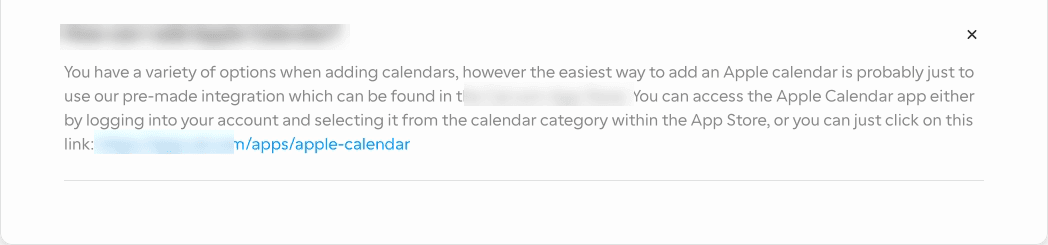
In one of the FAQ answers the link fields are swapped: the visible link text is a raw application URL, while the actual href contains a 419-character paragraph of the answer text.

The link looks perfectly valid — highlighted in blue — but clicking it leads to a non-existent address, even though the answer explicitly invites the reader to click it.

An FAQ answer where the visible link text is a raw URL
The visible text of the link is a URL; the href behind it is a paragraph of prose. Branding blurred.
F-8Medium

A second broken link on the FAQ page

A documentation link redirects to a help-center article that answers 404. Same class as F-1: a one-level check sees the 301 and misses the defect.

F-9Mediumlead-loss risk

A honeypot field shares its name with a real form field

The contact-sales form has 5 visible fields and 11 hidden honeypot fields. The honeypots are built correctly — aria-hidden, tabindex -1, positioned off-screen — but one of them has the same name as the visible required message field. On submit, two values are sent under one key: the user’s text and the honeypot’s empty string.

What follows depends on how the receiving side reads the request, which cannot be seen from outside. If the body is parsed naively (take the value by key), then a honeypot emptiness check endangers either the delivery of real submissions or the honeypot itself. If the fields are collected explicitly by element references, the name collision has no effect.

So this is not a confirmed defect but a spot the owner should verify: the cost of the mistake is silently lost leads, the cost of checking is a few minutes. Renaming the honeypot field is worth doing either way.

Evidence: Checked in the browser without submitting: FormData.getAll() on the shared name returns two values

F-10Lowobservation

The same JavaScript error in the console on every page

All 16 pages log the same fetch error about a missing user field in a response.

The honest caveats: the source is the site-builder’s bundle, not the site’s own code; the message is formatted, meaning the exception is caught and handled; the likely cause — requesting the user’s name for an anonymous visitor — is expected for a guest.

So this is not a defect but input for two owner decisions: report it to the site-builder vendor, and account for it in diagnostics — constant console noise masks real errors when they appear.

F-11Low

The web app manifest fails to load (403)

The manifest is linked from a third-party JSON hosting service and answers 403. Installing the site as an app doesn’t work, and the icon and theme colour defined in the manifest have no effect.

Method note: this finding comes from a live browser session — a headless browser does not request the app manifest on normal page load, so automated scans miss this class entirely.

Evidence: The manifest request was replayed independently; the 403 status is confirmed

F-12Low

Debug output in the production build

The home page logs 5 internal component-props dumps to the console — internal component names and parameters are visible to any visitor. The other 15 pages don’t have these.

Additionally, every page carries the site-builder’s editor-mode message, and on three pages a third-party review widget logs that it found no images for its selector — the widget didn’t render its pictures there.

F-13Lowlayout · 1920×1080

Overlapping links on the FAQ page

Four pairs of links overlap by bounding box: three around a single link in a hints block (overlaps up to 175×18 px) and one separate case in the footer (54×13 px). The other 15 pages have no overlaps.

Caveat: an 18 px vertical overlap equals the line height, which is typical for links wrapping onto two lines — some of these pairs may be the same measurement artifact described in our false-positives triage. Needs visual confirmation before being raised with the owner; hence Low.

F-14Lowa11y · WCAG 1.4.1

An in-text link distinguishable only by colour

On the security page, a link inside a paragraph differs from the surrounding text only by colour. A user with a colour-vision deficiency cannot tell it apart from regular text.

F-15Lowa11y · WCAG 1.3.1

Heading structure violations

One page has two h1 elements. Two pages jump from h1 straight to h3, and one page from h2 to h4.

F-16Mediumanalytics · privacy

Another visitor’s analytics session is frozen into links on every page

The “Sign in” and “Support” links — two on each of the 16 pages, 32 in total — carry cross-domain analytics linking parameters with hard-coded values of a client identifier and session marks. The values are static: identical for every visitor, not substituted by the analytics script at click time as the linking mechanism expects.

Decoded timestamps point to February and March 2025 — the markup contains identifiers of two specific visitors captured over a year ago, handed to everyone who clicks these links since.

Two consequences. Funnel measurement: the transition from the marketing site into the app is exactly the joint cross-domain linking exists for; right now every visitor arrives in the app under the same borrowed identifier, so end-to-end attribution does not work. Privacy: the analytics identifiers of two real people are published in the source code of every page.

Steps to reproduce

  1. Open any page
  2. Inspect the href of the “Sign in” link in the header
  3. The linking parameter carries a constant value instead of a per-visitor one
F-17Mediuma11y · WCAG 2.5.8 (AA)

Sales form fields are 16 px tall — below the mandatory AA minimum

Three input fields of the contact-sales form measure 200×16 px. The AA minimum is 24×24 px — an 8 px shortfall in height. These are not in-text links covered by the inline exception, but standalone controls of the primary sales form.

The header of all 16 pages also has a “Sign in” link at 45×16 — same class, same shortfall.

Evidence: Target-size measurements from the scan data for the sales page

Checked — no issues found

  • Layout at 1920×1080. No horizontal overflow on any of the 16 pages; no clipped text in controls; overlaps only on the FAQ page (F-13).

  • Link integrity. Of 111 unique addresses, three are broken (F-1, F-7, F-8). The 403/429 responses from review platforms are those services’ bot protection, not defects of the site.

  • Alternative text. 55 images on the home page, all with alt attributes; the only gaps are the four video previews (F-6).

  • Form field labels. All five visible fields of the sales form have correctly associated labels — verified in the browser. A seeming discrepancy in the raw scan was traced to a scanner heuristic that doesn’t resolve label-for association; axe, which does, reports no label violation on the page.

  • Form validation. Submitting the empty form is blocked and focus moves to the first empty field.

  • Network errors. No 4xx/5xx responses on any page — except the manifest (F-11).

  • Page language. The lang attribute is set.

Want a report like this for your product?

Fixed scope, clear deliverables — we reply within 24 hours with scope and a quote.